

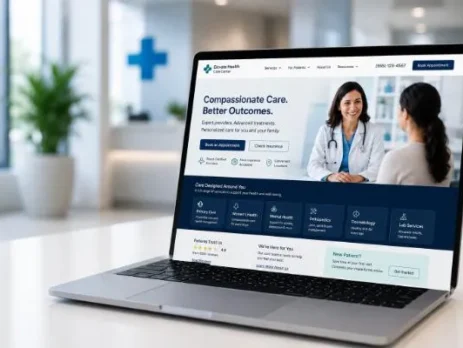
From Clicks to Consults: How Healthcare Landing Pages Cut Cost per Qualified Lead
You flip campaigns on. Budgets hum. For an hour, it even feels like liftoff.
Then the line goes quiet. Form fills trickle in. Half ask, “Do you take my insurance?” and vanish. You can hear the budget meter run while your calendar stays spotty and your team waits for real appointments.
The leak is usually the landing page. Ads get people in the room. Your page either closes the appointment or loses it. If you want booked visits, procedures on the schedule, and predictable revenue, build a conversion-first healthcare landing page that moves the right patients to act and filters out the rest. That’s how you take control of CPQL.
CPQL Beats CPL: Why “Qualified” Is the Metric That Pays You
Cheap leads don’t fill schedules. Qualified leads do.
- A lead is anyone who raises a hand.
- A qualified lead fits your services, has a clear intent, aligns with insurance or self-pay, lives close enough, and wants care on a reasonable timeline.
In healthcare, that filter isn’t optional. Clinical fit, compliance, and your reputation depend on it.
Here’s the funnel in plain English:
- CPL (cost per lead): the cost to generate an inquiry.
- Qualification rate: percent who are a fit and show intent.
- Show rate: percent who keep their appointment.
- Revenue per appointment: what you earn when they’re seen.
- If you chase CPL alone, you’re flying half blind.
- CPQL is the lever that pays the bill: CPQL = CPL x (1 / qualification rate)
Tighten qualification before leads hit your front desk and CPQL drops—often without increasing media budgets. A conversion-first page sets expectations, answers blockers, and routes the right people to you fast.
Why Generic Pages Quietly Bleed Budget
 Healthcare is trust-sensitive and regulated. Generic pages waste spend because they fail the moment a real person arrives.
Common failure points:
- Intent mismatch: traffic from “dental implants financing” or “ADHD assessment near me” lands on a generic services page. Relevance is buried, and people bounce.
- Vague value: “Quality care for everyone” doesn’t answer: Is this for me? Will it work for my situation? How soon can I be seen?
- Friction: slow loads, long forms that ask for sensitive data, unclear insurance acceptance, and a fuzzy next step.
- Trust gaps: no visible credentials, bland reviews, weak privacy cues, and locations hidden below the fold.
- Mobile mess: tiny tap targets, no click-to-call, addresses that don’t open maps, broken modals.
We often see clinics sending paid traffic to a homepage pay 40–70% more per qualified lead than traffic sent to a focused, conversion-first page.
You don’t need more traffic. You need a page that does the hard work on arrival: clarity, proof, speed, and a crisp path to the right action.
The Conversion-First Framework (Built for Healthcare)
 Use this framework across specialties, from behavioral health to ortho to fertility, while staying compliant and human.
Message match that locks in relevance:
- Mirror the ad in your headline: if your ad says “Same-Week ADHD Evaluations in Pasadena,” the page should lead with exactly that.
- Repeat the procedure or location in your subhead.
- Add a specific benefit line: “Board-certified clinicians, insurance-friendly scheduling, HIPAA-secure intake.”
Value clarity without hype:
- Speak to what patients care about: safety, outcomes in plain language, speed to appointment, staff experience, and payment options.
- Avoid guarantees and dramatic claims. Precision builds trust faster than promises.
Trust signals that actually land:
- Put provider credentials and years in practice near the hero. Add affiliations and hospital memberships if permitted.
- Use HIPAA-safe forms with explicit consent language. Not negotiable.
- Include privacy and ADA notes where they’re visible but not pushy.
Visual hierarchy that drives action:
- Above the fold: one primary CTA (Book Consultation or Call Now). Add a secondary option (Check Insurance or See Eligibility) nearby.
- Back your CTA with proof: star ratings, short review snippets, or a “Why patients choose us” list.
- Keep the hero clean. Its only job is to make the next step obvious.
Speed and mobile-first execution:
- Meet Core Web Vitals. Trim scripts. Make the page feel instant.
- Add click-to-call, sticky CTAs, and map links. Big tap targets. No pinching, no guessing.
Friction management:
- Use progressive forms: start short, then branch.
Ask only what’s needed pre-appointment. Don’t gather Protected Health Information (PHI) you don’t need.
Offer two paths: fast booking for high intent, low-friction education for researchers.
Build pages that earn attention, qualify fit, and feed your front desk better conversations.
Pre-Qualification That Lowers CPQL (Without Killing Volume)
Pre-qualification isn’t your enemy. Bad pre-qualification is.
Smart fields that route, not repel:
- Start minimal, then branch: “How do you plan to pay?” (Insurance or Self-Pay), “Your ZIP code,” “How soon do you want to be seen?”
- Use answers to improve routing and lead quality. Collect more detailed information after the initial hand-raise.
Microcopy that calms nerves:
- Add reassurance near sensitive fields: “HIPAA-secure form,” “No obligation,” “Our team responds within 1 business hour,” “Text OK? We’ll never share your number.”
Dynamic content by campaign, and compliant:
- Tailor benefits, FAQs, and proof to the ad group: financing info for fertility, implant durability, and recovery timelines for dental, privacy-forward language for behavioral health.
- Keep clinical claims conservative, anonymized, and de-identified. Don’t imply guaranteed outcomes.
Triage paths that fit intent:
- Fast-path: Call Now and Book Consultation, with click-to-call and real-time scheduling.
- Nurture-path: Check Insurance, Text Our Care Team, Download Pre-Op Checklist, or Take the 2-Minute Fit Quiz. Tag each path in your CRM to track downstream performance.
Done right, you keep volume where it belongs while screening in better matches.
Proof That Persuades (Without Crossing Lines)
People trust people. In healthcare, proof must be precise and respectful.
Social proof, used carefully:
- Use short review excerpts with a first name or initial and date. Include star ratings from verifiable sources if platform policy allows.
- Favor anonymized outcome language: “Many patients report improved mobility within weeks.” Use specific claims only if you can support them and remain compliant.
- Be cautious with before-and-after images. If there’s policy risk, skip them or use neutral visuals that inform without misleading.
Safety and compliance cues:
- Display HIPAA notice links, consent checkboxes, ADA statements, and appropriate security badges.
- Show accepted plans (with permission) and financing in a clean, scannable block.
Location clarity:
- Add a map, parking notes, and hours near the bottom. If you have multiple locations, include a selector near the top. Note telehealth availability when relevant.
Illustrative layout ideas (text-only):
- Top-right of hero: Primary CTA (Book Now) with phone number below.
- Under headline: three “Why patients choose us” bullets plus a slim credential row (board-certified, years in practice).
- Mid-page left: reviews module with 2–3 short excerpts.
- Mid-page right: insurance and financing next to the form.
- Sticky mobile footer: Call, Book, and Check Insurance.
Speed = Trust = Lower CPQL
Slow pages feel risky. That “something’s off” feeling kills conversion and qualification. Most searches happen on mobile devices, often over slower connections. If the first screen doesn’t load in under two seconds, bounce and CPQL climb together.
Quick wins
- Compress images and use modern formats. Lazy-load everything below the fold.
- Defer non-critical JavaScript. Remove third-party scripts you don’t need.
- Use server-side rendering or static generation.
- Render form inputs instantly. Avoid layout shifts that make people miss taps.
Pair this with a Free Website Speed + Core Web Vitals Review. Know exactly what to fix first. Better speed often improves ad quality signals, which can lower media costs and magnify your CPQL gains.
Tracking, Scoring, and the CRM Loop
Lower CPQL depends on two things: seeing what works, and fast follow-up. If you can’t track through to outcomes or you’re slow to respond, you’ll torch the gains a great landing page creates.
Track what matters
- Calls (first-time vs. repeat), form starts and completes, insurance checks, eligibility clicks, and scheduler events (view, start, complete).
- Separate high-intent events (click-to-call from the hero, direct calendar booking) from nurture events (guide downloads, SMS inquiries).
Capture offline conversions
- Use call tracking with session-level IDs. Tie calls to campaign, keyword, and page variant.
- Push a unique lead ID from the page into your CRM. Append appointment and revenue outcomes to close the loop.
Score and route leads
- Assign points to pre-qual answers: in-radius ZIP, insurance fit, under-7-day timeline.
- High score? Route to phone or text first. Lower score? Move to nurture.
- Flag duplicates to protect data quality and team time.
Automate the gaps
- Instant confirmations via SMS or email, with next steps and FAQs, reduce no-shows.
- Missed-call text-back within 1–2 minutes recovers leads that your team can’t answer in real time.
- Appointment reminders (SMS + email) lift booked-to-seen rates.
- Set Service Level Agreements (SLAs) by score tier. For example, high-score leads get a response within 10 minutes during business hours.
Stay compliant
- Use HIPAA-compliant forms and storage. Log consent. Keep audit trails on communications. Train staff—tools help, teams make it real.
When your page, tracking, and CRM move in sync, CPQL drops and stays down.
A Simple Test Plan to Lower CPQL Every Quarter
 Prioritize tests that improve both conversion rate and qualification rate. Wins should protect CPQL and grow downstream revenue, not just inflate raw form fills.
High-impact test ideas
- Headline match: exact keyword/location mirror vs. broader benefit-led headlines.
- Hero CTA copy: “Book Consultation” vs. “See Eligibility” vs. “Call a Care Coordinator.”
- Insurance placement: above-the-fold chip list vs. mid-page module.
- Form structure: five-field single step vs. progressive two-step.
- Proof order: reviews above credentials vs. credentials above reviews.
- Mobile sticky bar: presence vs. no sticky bar; button labels and order.
Sample test matrix (illustrative)
- Headline match (exact intent vs. generalized). Watch conversion and bounce.
- Primary CTA (“Book Now” vs. “Check Insurance”). Watch conversion and qualification.
- Form branching (add “timeline” in step one). Watch qualification and speed-to-book.
- Insurance clarity (add “We accept [Top Plans]” near the hero). Watch call volume and call quality.
- Speed push (image compression + script deferral). Watch mobile bounce and time to first interaction.
How to read results: If conversion rises but the qualified rate drops, CPQL likely worsens. Score leads, track bookings, and optimize to CPQL and revenue per appointment. That’s the number that pays you.
Media + Landing Sync: Make Every Channel Hit Clean
Your page is not an island. Match each channel to a landing experience that continues the exact conversation you started in the ad.
Search
- Keep ad groups tight by procedure, condition, and location. Send each to a matching page or section.
- Use sitelinks for secondary actions such as “Check Insurance” or “Meet the Team”.
Social
- Pre-qual in the creative: who it’s for, who it isn’t, what to expect next.
- Short videos that answer top objections warm colder audiences. Send them to a page that answers that same objection first.
OTT/CTV
- Use a vanity URL or QR code to a streamlined mobile page with one job and near-instant load.
- Keep tracking tightly so you can attribute visits and calls.
Retargeting
- Segment by pre-qual answers. If someone checked insurance, send them to scheduling. If they browsed education, offer a guide or SMS chat.
- Keep frequency sane. Overexposure hurts trust and wastes money.
Tight alignment compounds CPQL gains across the board.
Quick Story: A Hypothetical Ortho Clinic (Illustrative)
Consider a typical case we often see: a multi-location orthopedic clinic.
- Baseline: CPL $120, 25% qualified, CPQL $480.
- Roadblocks: generic service page for all traffic; insurance info buried; no mobile click-to-call; forms ask for unnecessary PHI.
After a conversion-first rebuild and CRM loop
- CPL dropped to $95 (better relevance and higher quality scores).
- Qualification rate rose to 40% (clear insurance block, ZIP filter, timeline question).
- CPQL fell to $238. Booked appointments rose 20%.
What moved the needle
- Exact message match by procedure and location.
- Smart pre-qual branching (insurance, ZIP, timeline).
- Insurance clarity block near the hero.
- Speed gains and mobile-first layout.
- Lead scoring with call routing and missed-call text back.
The pattern is simple: set expectations, answer real questions, and connect quickly.
Common Pitfalls That Keep CPQL High
- Asking for PHI you don’t need on first contact.
- Hiding insurance and financing until late.
- Long forms with no progress cues or reassurance.
- Sending every click to a homepage or all-purpose services page.
- Reporting clicks and total calls without tracking qualification or appointments.
Avoid these, and your CPQL curve bends down fast.
Your Field-Tested Checklist
Score your next healthcare landing page against this list:
- Headline mirrors ad/search intent and location.
- Subhead says who it’s for and what happens next, in plain language.
- Primary CTA above the fold; secondary CTA for lower-intent visitors.
- Provider credentials and years in practice are visible early.
- Reviews module with sourced, compliant excerpts.
- Insurance and financing clarity within the first scroll.
- HIPAA-safe, progressive form with explicit consent language.
- Smart pre-qual fields: insurance/self-pay, ZIP/city, timeline (kept minimal upfront).
- Mobile-first layout: click-to-call, sticky CTAs, map link, large tap targets.
- Core Web Vitals met: fast first paint, stable layout, minimal script bloat.
- Event tracking: calls, form starts/completes, eligibility clicks, scheduler events.
- CRM tie-in: unique lead IDs, attribution, revenue tie-back.
- Lead scoring and routing rules with SLAs and missed-call text back.
- Automated confirmations and reminders to reduce no-shows.
- ADA and privacy notices clearly available; data handling documented.
Hit 80% of these, and CPQL usually moves the right way.
Take Control of CPQL
 You don’t need luck or bigger budgets to fix your pipeline. You need precision pages that respect intent, qualify cleanly, and move the right people to action. Tighten the landing experience, and your media gets more efficient. Your front desk gets better conversations. Your calendar fills with the right appointments.
If you want a jump-start, book a quick review. We’ll show where the leaks are, what to fix first, and how to lock in a lower CPQL quarter after quarter.
Resources to help you execute:
- Build fast, mobile-first pages with Website Design: https://www.navazondigital.com/website-design/
- Align ads and landing intent through Pay Per Click / PPC Ads: https://www.navazondigital.com/ppc-agency-los-angeles/
- Capture organic intent with SEO – Search Engine Optimization: https://www.navazondigital.com/search-engine-marketing/
- Nurture research-stage leads via Email Marketing: https://www.navazondigital.com/email-marketing/
- Sharpen messaging to real patient segments with Audience Persona: https://www.navazondigital.com/audience-persona/



Leave a Reply
You must be logged in to post a comment.